
How to Use an AI Resume Writer: A Practical Step-by-Step Guide
A generative AI tool can turn your raw work history into polished, keyword-matched text in minutes — but only if you feed it the right information and edit what it gives back. This guide walks through exactly how to use an AI resume writer from first prompt to final PDF, and where a human still has to stay in charge. Hiring in most occupations still runs through a formal application and screening step, according to the U.S. Bureau of Labor Statistics, which is exactly where a sharper resume earns its keep.
Think of the tool as a fast first-draft assistant, not a replacement for your own judgment. Below is the workflow professional writers actually follow, plus honest notes on ATS myths, ethics, and the mistakes that get AI resumes rejected.

An AI resume writer helps you move faster and organize your experience — it does not guarantee an interview or a job offer, and it cannot verify facts about your own career. The final accuracy and honesty of what goes on the page is on you, not the tool.
What an AI Resume Writer Actually Does (and Doesn’t)
An AI resume writer is a generative AI tool that reads your work history and a target job description, then drafts sections of your resume in that specific voice and format. An AI resume builder or AI resume maker works from the same core idea: you supply raw facts, the AI-powered resume tool restructures them into recruiter-friendly language and pulls in the keywords an applicant tracking system (ATS) is likely to scan for.
What it’s great at
An AI resume writer is strong at:
- Rewriting flat, duty-based lines into achievement-focused bullets
- Drafting a two-to-three-sentence professional summary
- Matching your wording to a specific job description
- Suggesting a relevant skills list and layout
Used well, it can produce a tailored resume and a matching cover letter in about five minutes, which is why it has become the default first step for many job seekers rather than starting from a blank page.
What it can’t do for you
The tool doesn’t know your real numbers — money saved, percentage growth, client counts — and if you don’t supply them, it will invent plausible-sounding ones instead. It’s also noticeably weaker for career changers and unconventional job titles, where there’s no clean template to pattern-match against. The final truthfulness and precision of every line is a responsibility only you can carry.
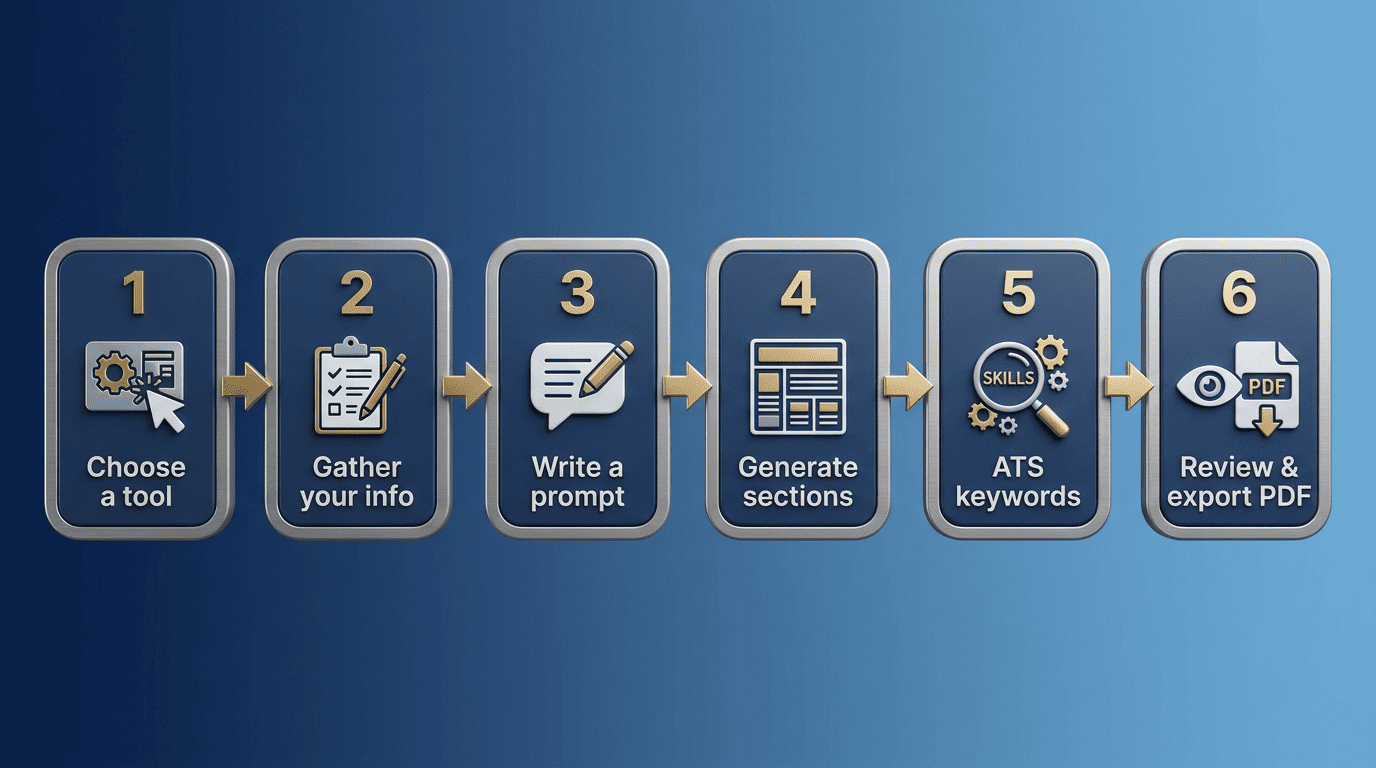
Step 1 — Choose the Right AI Resume Tool
There are two practical paths: a dedicated AI resume builder or a general chatbot like ChatGPT, Copilot, or Gemini. Dedicated builders bundle templates, formatting, and often an ATS-parsing check into one flow; general assistants are more flexible and usually free, but you do the formatting yourself.
| Dedicated AI resume builder | General AI assistant (ChatGPT, Copilot, Gemini) | |
|---|---|---|
| Templates | Built in, often ATS-tested | None — you format manually |
| Cost | Usually free tier + paid plans | Often free |
| ATS check | Frequently included | Not included |
| Flexibility | Fixed workflow | Open-ended prompting |
| Best for | A finished, formatted document fast | Drafting individual sections |
Dedicated AI resume builders
A dedicated builder takes your text and a target job posting and returns a tailored draft with a pre-built, ATS-tested layout. This is the fastest route if you want a finished document without wrestling with margins and fonts — an ATS-friendly AI resume writer handles the template so you can focus on the content.
General AI assistants (ChatGPT, Copilot, Gemini)
General assistants are more flexible and often free, but they don’t come with templates or built-in ATS checks, so you’ll format the output manually afterward. They’re particularly good for generating individual pieces — a summary here, a set of bullets there — that you then paste into your own document.
Step 2 — Gather Your Information First
Before you open any tool, collect the raw material: job titles, company names, employment dates, responsibilities, hard and soft skills, certifications, and education. Separately, pull the job description for the specific role you’re targeting — it’s the source of the keywords the AI needs to weave in.
| What to gather | Why it matters |
|---|---|
| Job titles, companies, dates | Base facts the AI can’t guess correctly |
| Responsibilities and skills | Raw material for bullet points and summary |
| Certifications and education | Fills out qualifications sections |
| Target job description | Source of ATS keywords and required skills |
| Real metrics (%, $, counts) | Prevents the AI from inventing numbers |
Build a «master resume»
A master resume is one document holding your full work history, every skill, and every accomplishment you can think of — the AI trims and reshapes pieces of it for each application. The more specifics you put in (numbers, tools used, measurable results), the better the output, because the AI resume generator has more real material to work from instead of filling gaps with generic phrasing.
Grab the target job description
The job posting is where the actual keywords and requirements live, and the AI needs them to tailor your resume instead of producing something generic. Skip this step and you’ll get a competent but forgettable draft that could apply to almost anyone in your field.
Step 3 — Write Effective Prompts
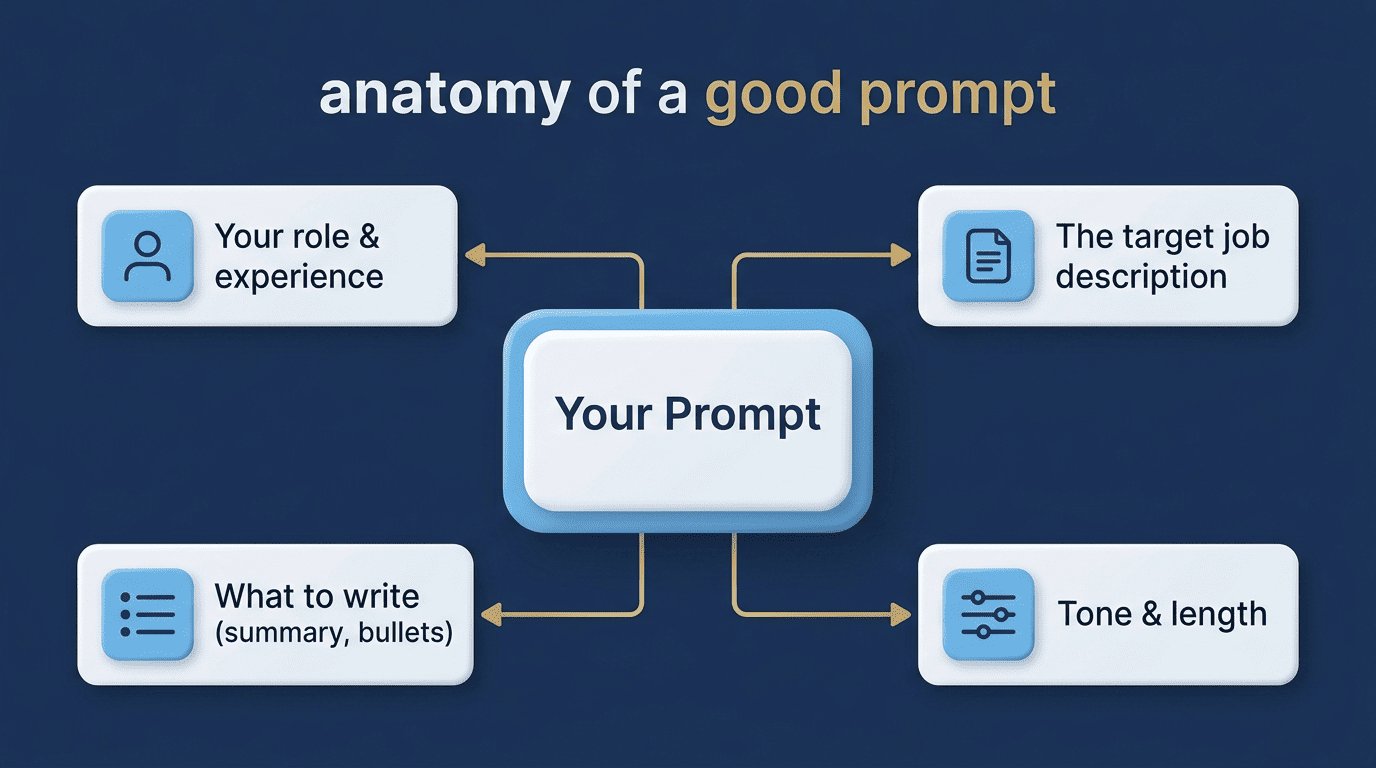
Specificity is what separates a usable draft from a generic one. A weak prompt like «write a resume» gives the AI almost nothing to work with; a strong prompt spells out your role, years of experience, industry, and target position.
- State your current or most recent job title and years of experience.
- Name your industry or specialization.
- Name the exact role or seniority level you’re targeting.
- Specify which section you want (summary, bullets, skills list).
- Paste the relevant part of the target job description.
- Ask for a specific length or tone if it matters (e.g., «2-3 sentences, confident tone»).
- Review the draft and ask for a revision if it’s too generic.
The anatomy of a good prompt
A good prompt combines role, experience, industry, and target position with a request for one specific section at a time. For example: «Write a professional summary for a marketing manager with 8 years of experience in digital advertising, targeting a senior director role at a technology company.» That level of detail is what produces text you can actually use with minor edits, instead of a paragraph you have to rewrite from scratch.
Feed it the job description
Paste the job description text directly into the conversation and ask the AI to identify the key requirements and weave the matching terms into your draft naturally. This single step does more to make a resume feel tailored to one specific opening than any other prompt technique.
Step 4 — Generate the Core Sections
Resumes generally follow one of three formats, a distinction CareerOneStop, a U.S. Department of Labor-sponsored resource, also walks through:
- Reverse-chronological — most recent job first, the default for most industries
- Functional — organized by skill category rather than job history, useful for career changers
- Combination — a skills summary up top, followed by a chronological work history
Whichever you choose, the AI resume writer builds out the same core pieces — summary, bullets, skills, and often a cover letter — one section at a time.
Ask for one section per prompt, not a full resume in one shot. Generating the summary, then the bullets, then the skills list separately gives you more control and a more focused result than asking for the whole document in a single request, which tends to produce shallower, less specific output across every section.
Professional summary
The professional summary should run two to three sentences and speak directly to the role you’re targeting, not a generic career overview. This is usually the first thing a recruiter reads, so it’s worth a second prompt if the first draft feels flat.
Achievement bullet points
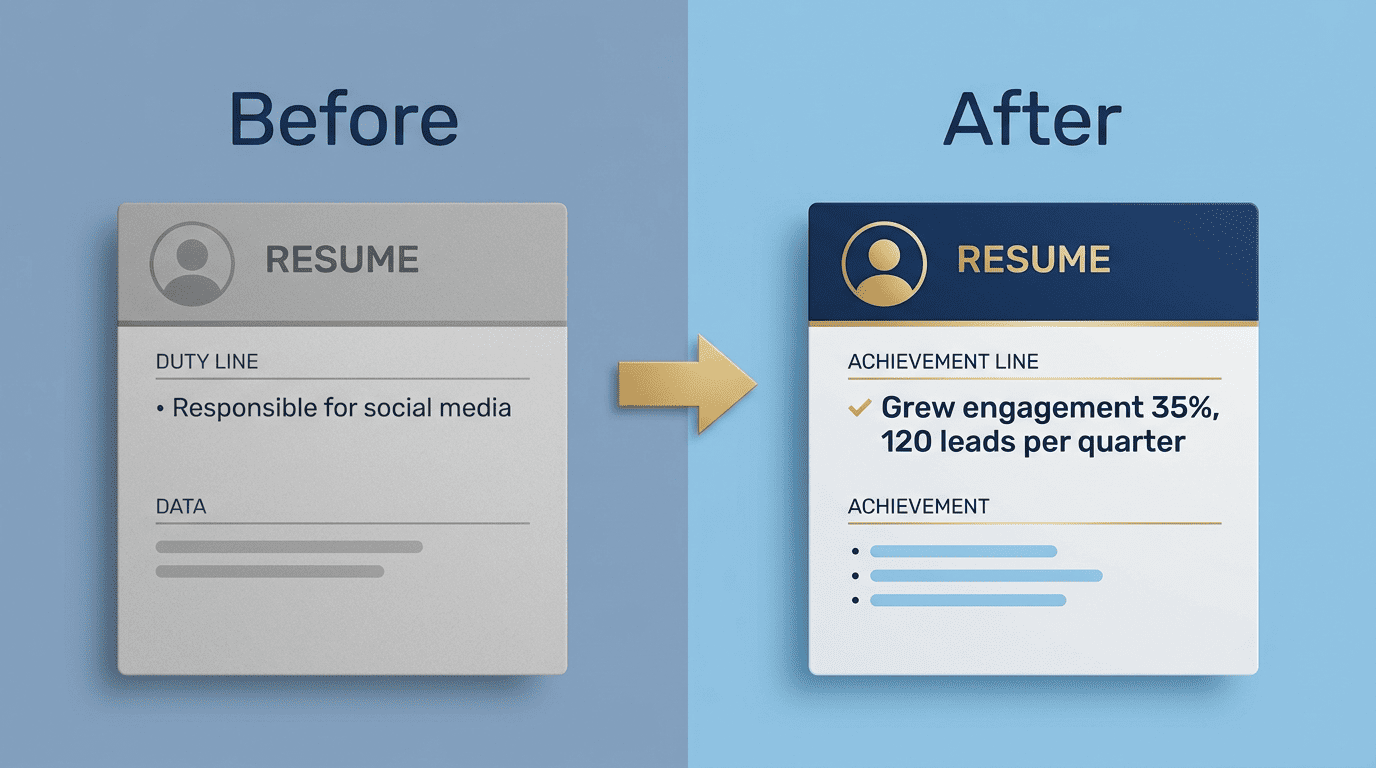
The AI can turn «responsible for social media» into «grew organic engagement 35% and generated 120 qualified leads per quarter» — but only if you supply the underlying numbers. Left on its own, it will either write vague duty-based bullets or fabricate a metric that sounds right, and neither serves you at interview time when someone asks how you got that number.
Skills and cover letter
The AI resume writer can extract relevant skills straight from the job posting and draft a matching cover letter from the same source material. Keep the finished resume to one or two pages regardless of how much the tool generates — length discipline is still yours to enforce.
Step 5 — Make It ATS-Friendly (Without Overdoing It)
Missing the right keywords carries a real cost: in a widely cited Harvard Business School/Accenture study, 88% of employers said qualified candidates get screened out of the hiring process for not matching the exact criteria and keywords their systems look for. That’s the case for using an AI resume writer to close the keyword gap — but it’s not the whole story on how ATS software actually behaves.
Match real keywords, don’t stuff them
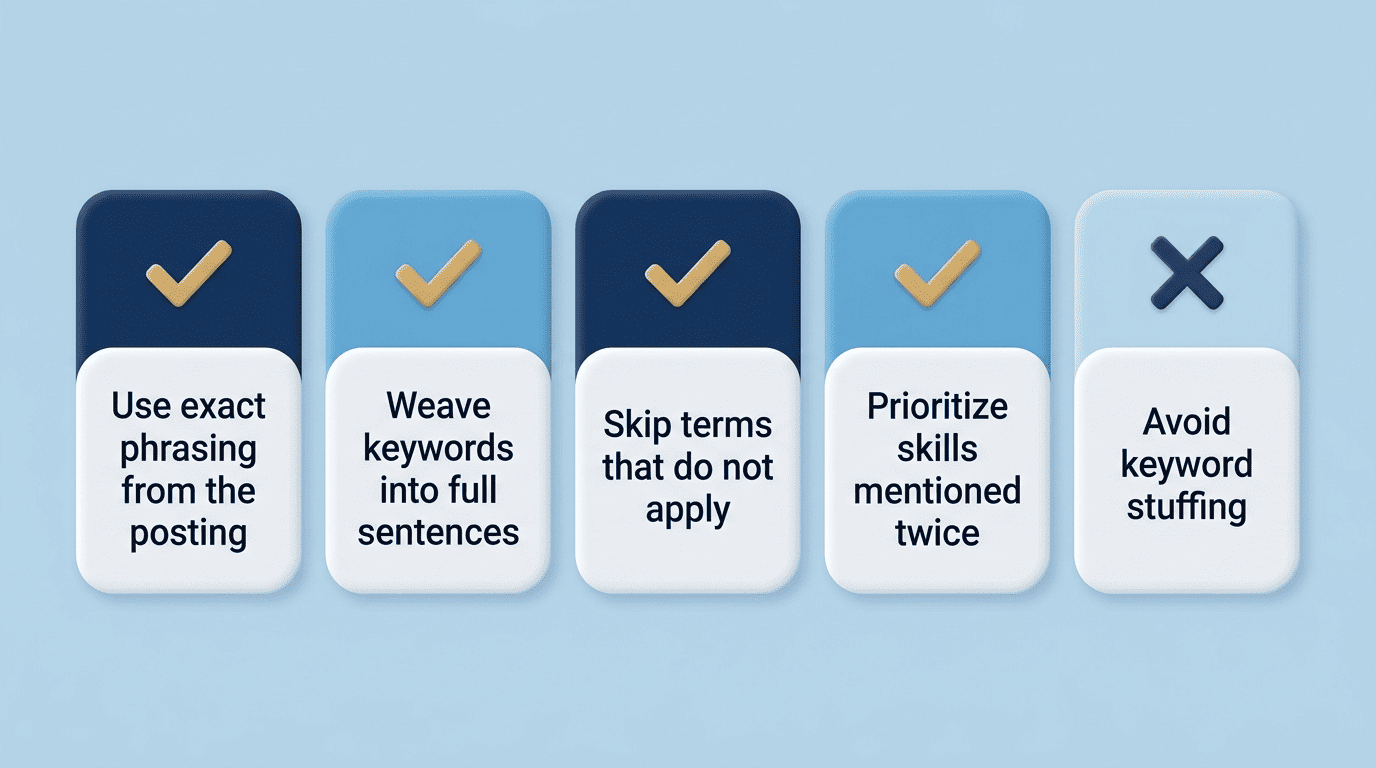
Pull the actual terms used in the job description and work them into your bullets and skills section naturally, rather than pasting a keyword list at the bottom of the page. A few habits keep this honest:
- Use the exact phrasing from the posting (e.g., «project management» instead of «managed projects») where it’s true to your experience
- Weave keywords into full sentences, not a dumped list
- Skip terms that don’t actually apply to your background
- Prioritize skills mentioned more than once in the posting
Recruiters notice keyword stuffing, and it reads as a red flag rather than a strength.
The ATS myth, honestly
The idea that an ATS is a robotic gatekeeper that auto-rejects resumes for minor formatting slips is largely overstated. In a 2025 Enhancv study of 25 U.S. recruiters, 92% said their ATS does not automatically reject resumes over formatting, content, or design, 88% cited relevant experience and skills as what they value most in a resume, and 76% cited natural, non-stuffed keyword use as a factor they value. Keywords help your resume get found, but a human still decides who moves forward — which lines up with how the Wikipedia entry on applicant tracking systems describes their role: sorting and searching applications, not making final hiring decisions.
Step 6 — Review, Fact-Check, and Personalize
A hiring manager can look at 100 resumes in a single week, and what separates the ones that get a callback is rarely the tool used to write them — it’s whether the content is specific, accurate, and clearly aimed at that job. This is the step most people skip, and it’s the one that matters most.
Kill the AI «tells»
Before you export anything, run through a quick pass:
- Strip out generic phrases and repeated sentence structures
- Add back your own voice and concrete details the AI flattened out
- Check every single metric the AI included against your real numbers
- Confirm every job title, date, and company name is accurate
Treat this pass as non-negotiable — a resume with one fabricated detail undermines every honest line around it.
Export properly
Save your working draft as a .docx, then export to PDF as the final version so your formatting doesn’t shift when a recruiter or an online AI resume writer exports it on a different device. A resume that looks perfect on your screen but reflows badly once opened elsewhere undermines everything the AI helped you build.
Is It OK to Use an AI Resume Writer?
As one staffing firm put it, the difference between using AI well and using it badly comes down to one distinction. That distinction is the whole ethics question in one sentence.
AI works best when it is used as a tool, or thinking partner. It works horribly when used as a ghost writer.
Abel Personnel, career advisors
The ethics line
Using AI to speed up drafting and sharpen your phrasing is fine. Using it to invent experience, credentials, or results you can’t back up is not — everything on your resume should be something you can explain and defend in an interview.
Can employers tell?
Sometimes a generic, unedited AI style is noticeable, but the real problem isn’t that AI was involved — it’s an unedited, unverified draft that never got personalized. Fix that, and the question of detection mostly stops mattering.