
AI Resume Writer for ATS: How to Beat the Bots and Land Interviews
Before a human ever reads your resume, software does. An AI resume writer online built for Applicant Tracking Systems (ATS) helps you produce a resume the machine can actually read and rank — clean structure, the right keywords, parser-safe formatting.
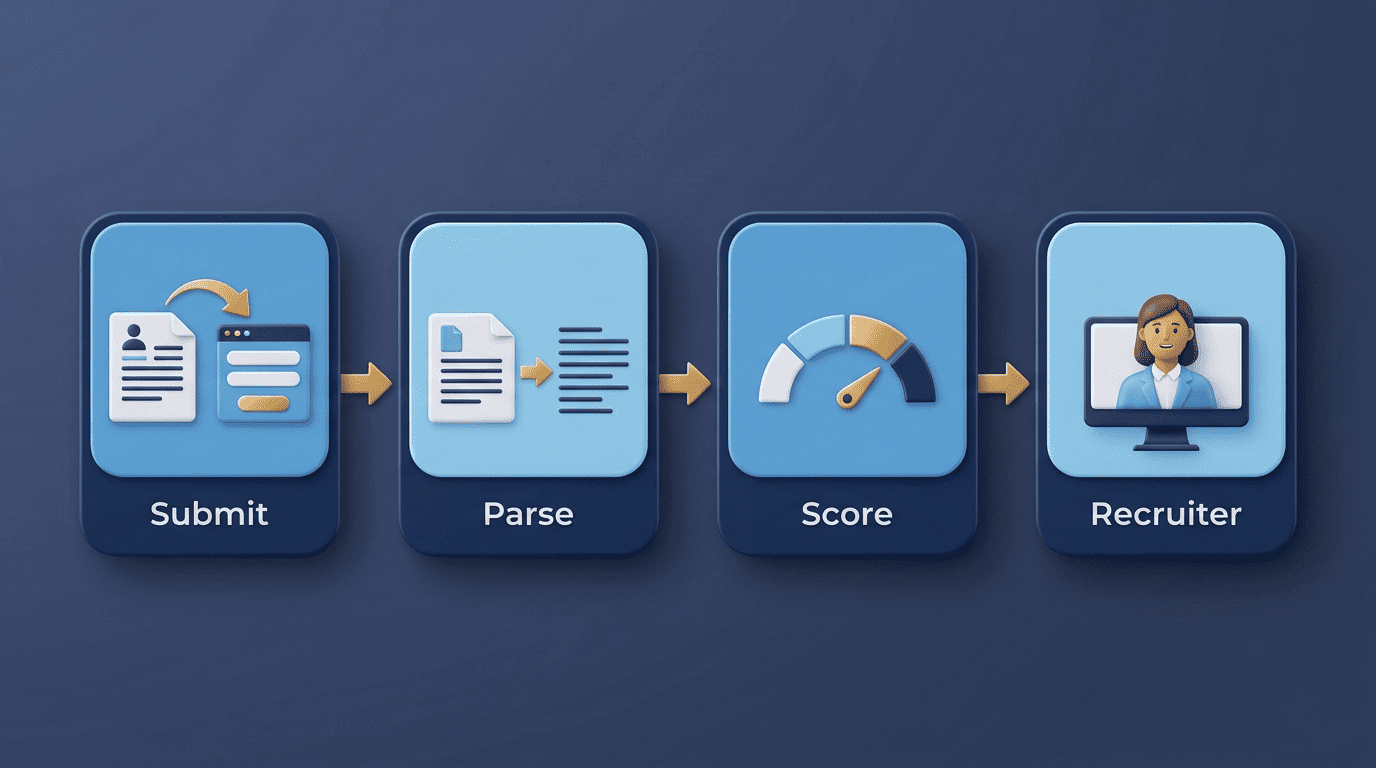
This guide explains how ATS parsing works, how an AI resume writer optimizes for it, and the exact steps to make your resume ATS-friendly. Worth saying up front: a tool like this helps you present your real experience better — it can improve your ATS compatibility, but it can’t guarantee that any specific Applicant Tracking System will pass you, or that you’ll get hired. The output is only as strong as what you actually did, so never let it invent a title, a certification, or a skill you don’t have.
What Is an ATS and Why It Decides Your Fate First
An Applicant Tracking System is software employers use to collect, parse, and rank job applications before a recruiter ever opens a resume. According to Wikipedia’s overview of applicant tracking systems, these platforms handle the entire hiring pipeline — from posting a job to storing candidate records — and most mid-size and large employers now run one.
How the ATS screening pipeline works
The flow is mechanical, and understanding it is most of the battle:
- You submit your resume through an online application form.
- The ATS parses the file and converts it into plain text.
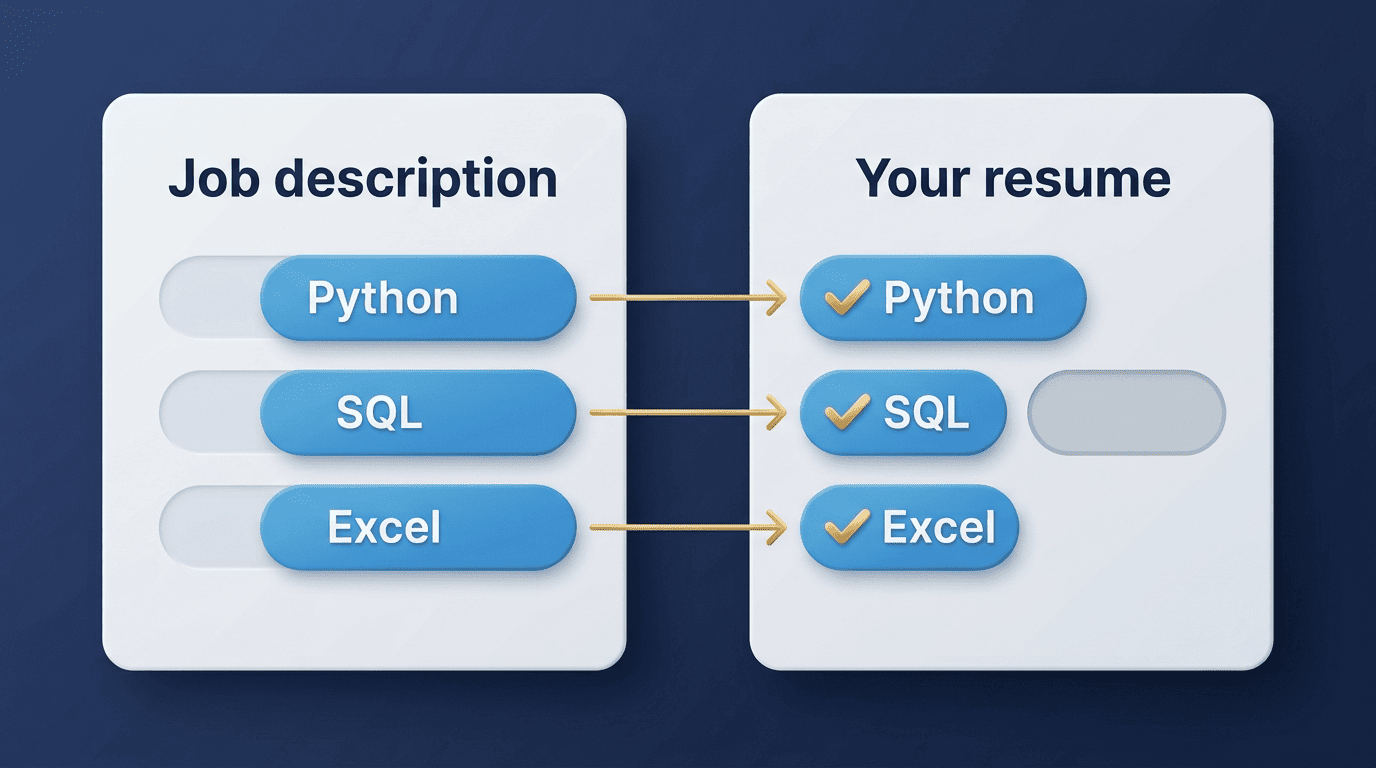
- It matches that text against the job description’s required skills and keywords.
- It assigns a score or ranking based on the match.
- Only the highest-scoring resumes are surfaced to a recruiter or hiring manager.
Major systems include Workday, Greenhouse, Lever, iCIMS, and Taleo. Workday, for instance, publishes its own recruiting platform documentation describing how job requisitions, candidate profiles, and screening questions feed into its matching logic — a useful reference if you want to see how an enterprise ATS is actually built rather than guess from forum posts. Behind the scenes, the text-extraction engines powering many of these platforms come from specialist vendors like Sovren and RChilli, not the ATS brand itself.
How common ATS really is
ATS use is widespread among mid-size and large employers, and the trend has only accelerated as hiring volume grew — the U.S. Bureau of Labor Statistics tracks job openings in the tens of millions per year, a volume no HR team could screen by hand. That said, temper the myth: not every application is auto-rejected by a faceless bot. Many ATS platforms simply organize and rank applications for a human reviewer rather than silently discarding them. The practical takeaway stays the same either way — assume a machine reads first, so make the resume machine-readable.
Why AI Resume Writers Are Built for ATS
A good AI resume writer reads a target job description, extracts the priority keywords and skills, and rewrites your bullets to mirror that language while staying truthful to your actual history. It flags parser-hostile formatting, suggests standard section headers, and produces a match or ATS score so you can see gaps before you apply — not after a rejection email.

What an AI resume writer actually does
- Extracts keywords from the job posting. Instead of you re-reading a job ad five times trying to guess what matters, the tool parses it and surfaces the terms that repeat, the required skills, and the exact phrasing the employer used.
- Rewrites your bullets to mirror that language. It keeps the underlying facts — your title, your dates, your actual accomplishments — but adjusts the wording so it lines up with how the ATS and the job description describe the role.
- Flags formatting that breaks parsers. Tables, columns, and graphics that look fine to a human eye can scramble or drop entirely when an ATS converts your file to plain text; a decent tool catches this before you submit.
- Produces a match score. Most tools show a percentage or letter grade estimating how well your resume aligns with a specific posting, so you can fix the biggest gaps first instead of guessing.
Score-and-fix loops
Keyword matchers score your resume against a specific posting, usually as a percentage, and list the missing terms by priority. Aim to close the gap on high-frequency keywords — but only claim skills you genuinely have. Adding a keyword you can’t back up in an interview does more damage than a lower match score ever would.
The Occupational Outlook Handbook (OOH) is the government’s premier source of career guidance, featuring hundreds of occupations.
U.S. Bureau of Labor Statistics
The same discipline the BLS brings to describing real occupational requirements is worth applying to your own resume: describe the work you actually did, in the vocabulary the employer uses, without inflating it.
Keywords: The Currency of ATS Ranking
Keywords are how an ATS decides relevance, and job seekers routinely underestimate how literal the matching is.
How to find the right keywords
Pull keywords straight from the job description rather than a generic list. Terms that appear more than once in the posting are your highest-priority matches. Match spelling exactly — an ATS often fails to recognize synonyms, so «Adobe Creative Cloud» and «Adobe Creative Suite» are not interchangeable to a parser. Indeed’s career-advice guide to ATS keywords recommends including both an abbreviation and its spelled-out form — for example, «SEO (Search Engine Optimization)» — so the resume matches however the system is configured to search.
Where to place them
Distribute keywords naturally across your summary, skills, and experience sections rather than dumping them in one block. A concise «Core Competencies» or skills list helps a parser find them quickly, but don’t keyword-stuff: modern recruiters and newer ATS platforms penalize obviously gamed text, and the resume still has to read well once it reaches a human.
| Placement | Purpose | Risk if overdone |
|---|---|---|
| Summary | First-pass relevance signal | Reads generic if copy-pasted |
| Skills / Core Competencies | Fast parser match | Wall of unrelated terms |
| Experience bullets | Proves the skill was applied | Awkward, unnatural phrasing |
| Job title line | Matches title-based filters | Misrepresents your actual role |
ATS-Safe Formatting Rules
Formatting decides whether the ATS can even read what you wrote, independent of how good the content is.
The do’s
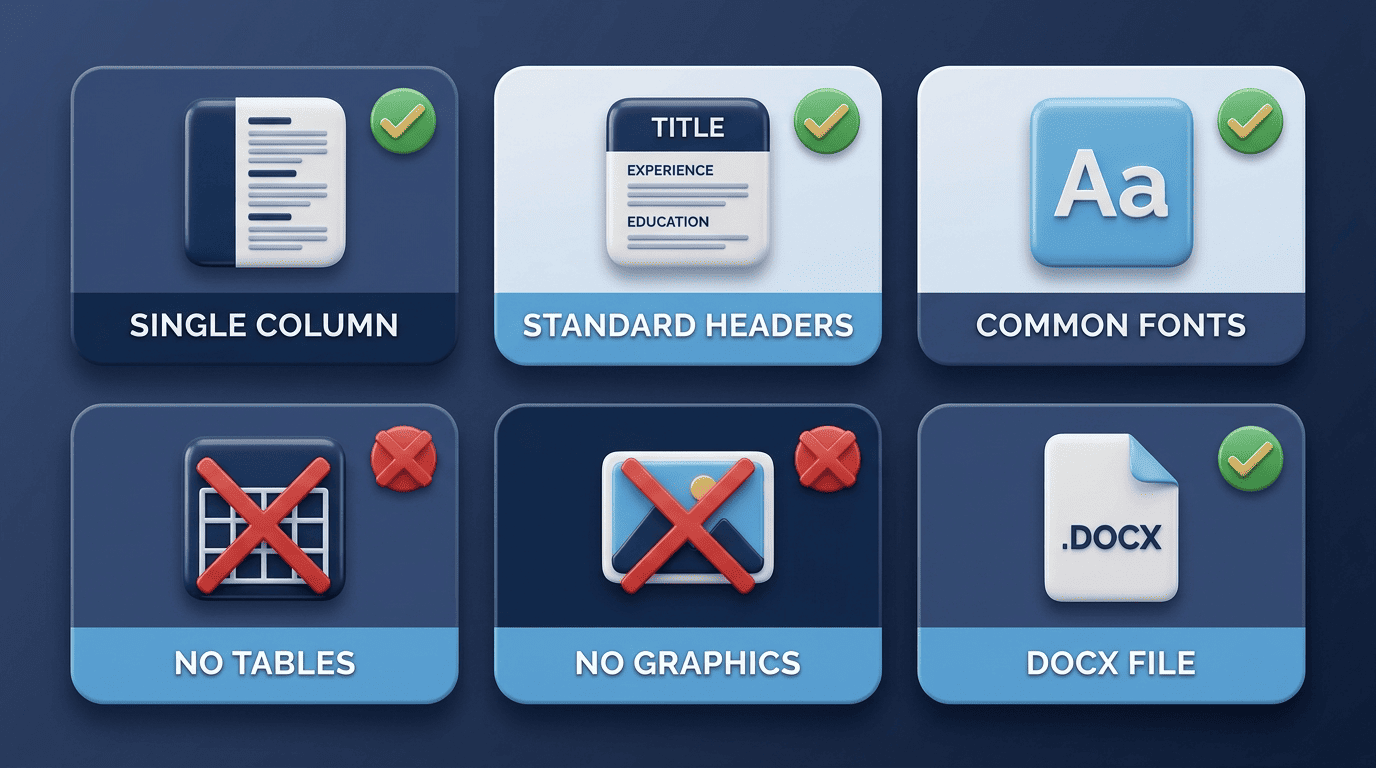
Single-column layout, standard section headers (Experience, Education, Skills), common fonts such as Arial, Calibri, or Times New Roman at 10–12pt, simple bullet points, and generous white space. These choices look plain, but plain is exactly what a parser handles reliably.
The don’ts (what breaks parsing)
Avoid tables, text boxes, multiple columns, graphics or charts, and placing critical information in headers or footers — parsers routinely drop content in those zones entirely. On file type, DOCX is the safest default; use PDF only when the posting explicitly accepts it. An AI resume writer that exports a text-selectable PDF or DOCX avoids most of these traps automatically, which is part of why relying on a generic word-processor template is riskier than it looks.
- Tables and multi-column layouts
- Text boxes and floating graphics
- Headers/footers holding your contact info
- Uncommon or decorative fonts
- Scanned images instead of selectable text
| Element | ATS-safe choice | What to avoid |
|---|---|---|
| Layout | Single column, linear order | Multi-column, side panels |
| File type | DOCX by default | Scanned image or design-heavy PDF |
| Section headers | «Experience,» «Education,» «Skills» | Creative labels like «My Journey» |
| Contact info | In the body text | In a header or footer |
| Fonts | Arial, Calibri, Times New Roman | Script or decorative fonts |
ATS Score: What Number Do You Actually Need?
There’s no single universal pass mark, and any tool claiming one exact cutoff for every employer is oversimplifying.
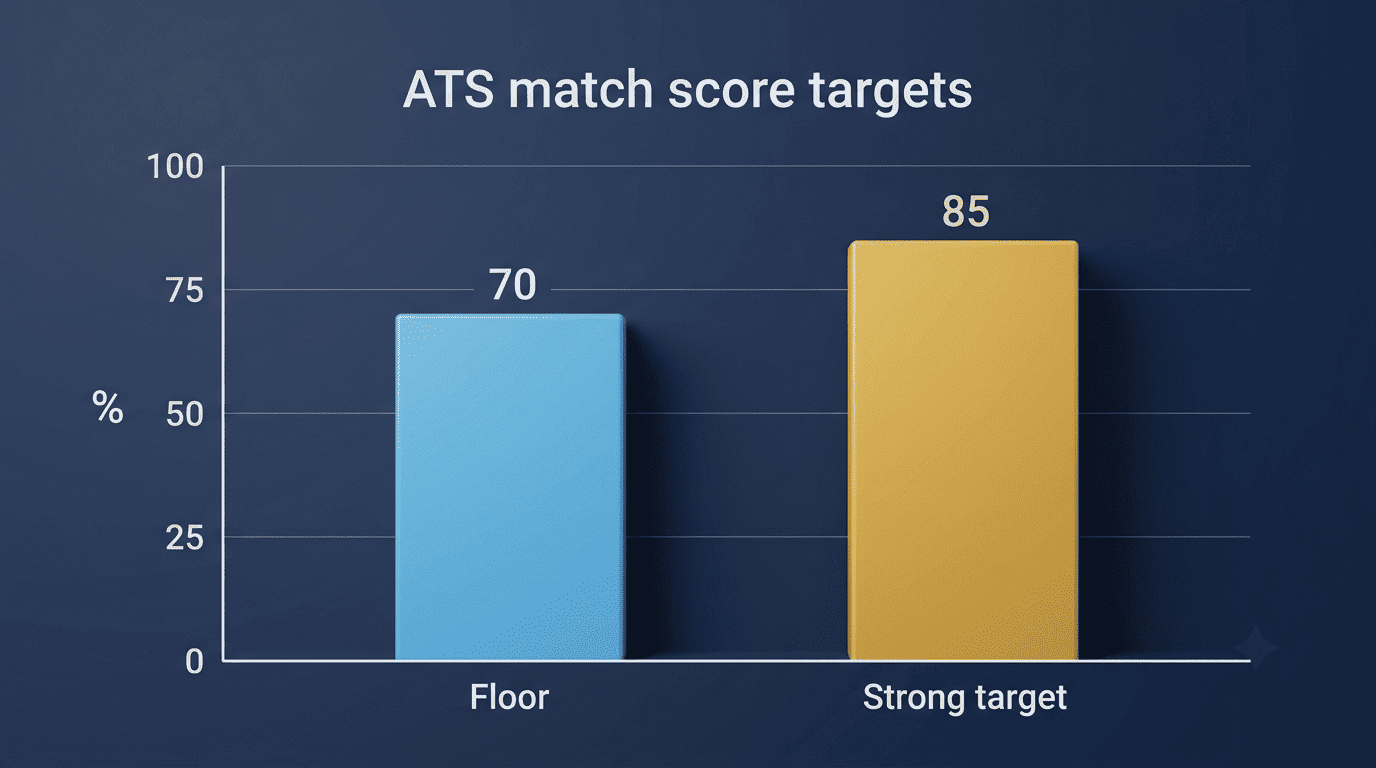
Many tools show a match percentage against a specific posting. 70% is generally treated as a reasonable floor, with many career-advice sources pointing toward 75–85% as the stronger target — but thresholds vary by employer and role, so treat the score as a directional signal, not a pass/fail law written in stone. Fix the highest-impact missing keywords first, then re-check the score rather than chasing every last point.
Will an AI-Written Resume Pass — and Get Noticed?
AI-optimized resumes tend to pass ATS screening well because they’re structured and keyword-aligned by design. But recruiters increasingly spot generic AI phrasing, so personalize the output: real metrics, real projects, your own voice. And stay honest — never fabricate titles, dates, employers, or skills you don’t actually have; an inflated resume can unravel fast in an interview or a background check, and it undermines the entire point of optimizing for a match in the first place.
An AI resume writer is a drafting and optimization assistant, not a guarantee of an interview or a job offer. It gets your real experience in front of the right eyes in the right words — the rest is still on you.